A look at business, law and life from a technophile.
Helpdesk
Valentine’s Day Statistics – Who gets What and How Much
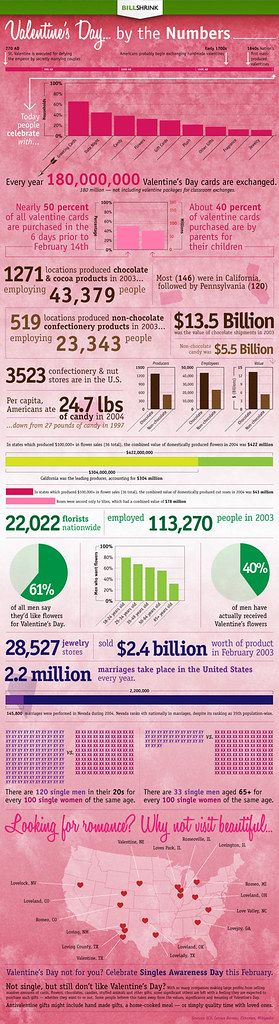
0Billshrink put up an interesting infographic on Valentines Day and they’re inviting people to share it. Here’s the surprising low-down on who gets what for Valentine’s Day. One of the most surprising stats is just how many parents buy cards for kids. I thought it was a “lovers” holiday.
–Ben
Droid BOGO – Buy a Droid, get one free from Verizon
0UPDATE 5/19/2010: The Droid BOGO sale is back on. See Droid Does for more details. Check in the top right corner. You’ll have to add the phone into your shopping cart to verify the Droid BOGO deal is still going. See the current Droid BOGO post for info.
UPDATE 5/18/2010: The BOGO sale is long over, but there are some deals to be had. It looks like the Droid is available for $19.99 from wirefly.com. (I am not an affiliate – it should be a clean link).
Verizon apparently is running a special on Droid and Droid Eris. Buy one phone, get a second of the same kind for free. Of course by free, I mean that you eventually get one phone for “free”, but end up paying the $30 times 2 surcharge for data and then a voice plan plus another $10 for another line that shares the minutes (or $60 times two for unlimited voice). But hey, there’s really no free lunch. Just an awesome phone.
In any case, if you were looking for his and her Droids, now might be the time.
–Ben
Source: Verizon, Phandroid, Phones Review
Skype App Coming to Verizon Wireless in March- Has Hell Frozen Over?
0Verizon Wireless and Skype just announced that Verizon is going to carry skype calls over its network starting in March. It may require a data plan, but those international calls may have gotten a lot cheaper.
Seriously? This seems such an about-face from the wireless carrier that was known to lock everything down and make you pay for any small incremental benefit (I’m looking at you, ringtones from the V-shop). I’m skeptically optimistic at this point. And I hope it continues.
Here’s the initial phones with Skype support:
- DROID by Motorola
- DROID ERIS by HTC
- Motorola DEVOUR
- BlackBerry Storm 9530
- Storm2 9550
- Curve 8330
- Curve 8530
- 8830 World Edition
- Tour 9630
–Ben
Sources: Skype, Verizon Wireless, PCWorld
Motorola Gives timeline for Android 2.1 for Smart phones and Droid
0Motorola has put up a page giving expected roll-out dates for their android phones to upgrade to Android version 2.1. Here’s the summary
- Droid – soon
- Milestone (Europe) – Q1 2010
- Milestone (Latin America) – No Date
- Milestone (Asia-Pacific) – No Date
- Cliq (USA) – Q2 2010
- Dext (Europe) – No Date
- Dext (Latin America) – Q3 2010
- Dext (Asia-Pacific) – Q3 2010
They also claim to be working closely with Google and carriers to bring “the most optimized” experience on each of the phones. Let’s hope that “the most optimized” doesn’t mean “missing features” in marketing spin.
–Ben
Sources: Motorola Support, Phandroid, InfoSync
Motorola Admits Jumping the Gun on Android 2.1 Details
0Apparently Motorola released the Droid 2.1 details too early according to their forum. Bummer. I was hoping the update would coming this week. I guess a few days more won’t hurt.
Maybe something good will come of this. Motorola has been getting some flak for releasing a “gimped Andriod 2.1” compared with the Nexus One.
–Ben
Sources: Motorola Forum, PCMagazine
Free Must Have Website Checking Tools
0I’ve been working on updating the skin to this site, and I wanted to comment on a couple of tools that I think are useful:
- Port 80 Software Analysis Tools – Compression Check, Bandwidth Savings Calculator, Cache Check, Header Check, Error Check
- Is My Blog Working – Basic Blog Idiot Test, Speed Details and Feature Test
- GID Network compression test – Is my blog compressed?
Fascinating Stuff. I’ll write about the plug-ins I’ve installed in another post, which is the reason I was using these sites.
-Ben
Sources: As stated above
1and1 Nameservers Down – Can’t find 1and1 DNS Status Page
0I just helped my brother set up his blog. I just discovered that a few days after setup the 1and1.com Nameservers have failed. See for yourself:
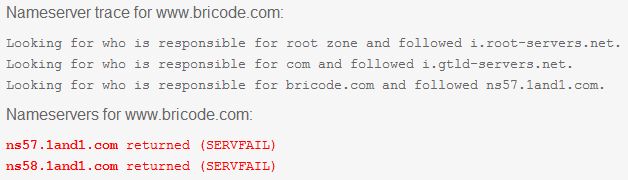
So, I go look to find a status page or something and I come up empty handed. Not a good sign in my opinion. However, this is the first failure that I’ve seen. Its just a very large failure.
–Ben
Fix – 1and1 hosting not updating or plugin problems
116 years
I just found out why my wordpress installation was not working as I expected. My wordpress updates would hang/not complete and the plugin installations would hang/stop or come back with errors. As it turns out, 1and1.com defaults to PHP version 4 to execute the php scripts. So, I just had to add the following code to the .htaccess file in my root of my blog directory:
AddType x-mapp-php5 .php
After that, everything started working real smoothly. So, make sure you update that PHP4 to PHP5 if you’re using 1and1.com.
–Ben
Reference: 1and1.com
Droid’s 2.1 Page removed from Motorola – Why – and link to pics
0Motorola had a informational page about what was contained in the 2.1 update. But they pulled it shortly thereafter. From the looks of it, nobody’s answering the question of why. However, Phandroid has a screenshot of the missing page.
The page showed the new features as:
- Text to speech for any text box
- Better virtual keyboard
- 3D Gallery – photos, videos and other image sources are shown in 3D stacks that move when the phone is tilted
- PINCH TO ZOOM – in web, gallery and maps (finally)
- News and Weather App/Widget
- Maps – syncs with desktop, personal suggestions, night mode
- Music App gets tabs to switch screens
- Google Goggles – including “reading” business cards and adding them to you contacts (Cool!)
- Fix on the Pattern Lock Bypass bug (I think)
- Yahoo email setup optimizations
- Better Battery Optimizations
For those of you who don’t know, you can manually check to see if you’re authorized for the update right now by going to Settings -> About Phone -> System Updates. If you’re not authorized yet, try back again later. Reclicking is not likely to do any good. Remember that this is a gradual roll-out like the last update.
–Ben
Get Last Modified Date from Webpage You’re Visiting
616 years
I found a neat little trick that allows me to get a last modified date / last changed date from a webpage I’m viewing.
Simply copy the code below into your address bar and it will cause a window to pop-up with the last modified date.
javascript:alert("Last Modified " + document.lastModified)
Very neat trick.
–Ben
Source: About.com