A look at business, law and life from a technophile.
Fix – MS Word – Remove Next Page Section Breaks – Get Rid of the Blank Page

UPDATE 4/10/2015: Note that you need to make sure that all of your pages are the same size. On one copy/paste, I noticed that the copied pages were A4, while my normal pages were letter size. Until all my pages were letter, I could not remove the next page section break.
UPDATE 10/10/2014: See update for a potential better way to fix stubborn next page section breaks that won’t delete. Thanks CherryBerry!
Problem: Word has an extra page at the end that you can’t delete, and when you turn on the Show/Hide codes function a “Section Break (Next Page)” appears after your text. In fact, every time you delete the Next Page Section Break, text moves to the last page.
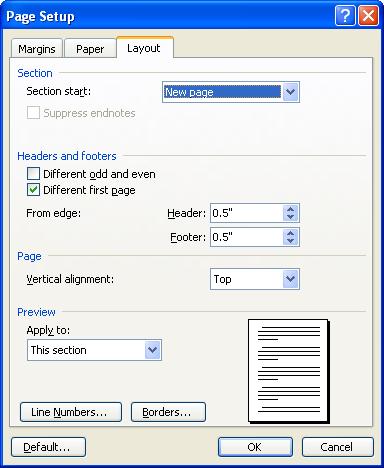 Solution: Click after the section break (i.e. on the last page). Go to File -> Page Setup … in the menu (in XP – in Later Versions, go to page setup). Click on the layout tab in the pop-up window. Change the Section Start from “New Page” to “Continuous” using the drop down arrow. Hit the OK button. Phew! See the Graphic to the Right
What happened: I have no idea. But this allows you to change a section break’s behavior. It appears that Word is insistent on always moving back any Next Page Section breaks if deleted. However, if you change the behavior of the current break, its OK.
Hope that Helps.
–Ben
Sources: See Suzanne S. Barnhill’s comment on Wugnet
UPDATE 10/10/2014:
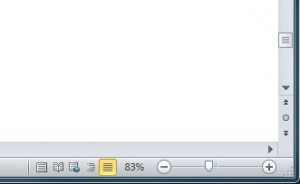 CherryBerry made a great comment below that fixes some of the more persistent next page section breaks:
“At the bottom-right corner of the window next to the size slider, there should be 5 icons. Click on the one closest to the slider, when you mouse over it, there should be a label thing saying “Draft”, click on that icon. there should be text saying “::::::::::::::::::::::::Section Break (Next Page):::::::::::::::::::::::::::”. Delete them.”
I’ve included a picture to show the draft button at the bottom right of the window.
Thanks CherryBerry!
–Ben
Thanks! you are a life saver
I have managed to delete the page break, but instead of just removing it, it moves it up higher in the document to replace a Continuous break. I am using columns in the document. Is this affecting it, and if so, how do I get it to stop moving the page break and just delete it instead? TIA.
I have a Word document that can’t be changed or deleted. I can delete the text and type new text. But, when I close Word regardless of whether I save or delete the document comes back with the original text when I open Word again. I’ve searched, talked to computer pros and nothing has fixed it.
Also when I try to open a new document this one comes up no mater how many times I click “New Document”
Thanks for sharing this! I didn’t realise till today you could do this, I haven’t been using word for very long, and not had any training using the software, tutorials like this have saved me a lot of time! I have also found some really helpful information on using word from the following. goo.gl/g15hs4
Thank you! This worked for me by following the instructions BUT only after doing an additional step. I’m using Word for Mac version 15.25.
When I got to:
“Change the Section Start from “New Page” to “Continuous” using the drop down arrow. Hit the OK button.”
Hitting the OK button generated an error about margins being outside of print error (which they were not). This error prevented Word from accepting the above change and putting me back into the document.
The work around is to click on Borders and within that window, click OK. Word will then finally accept the OK, convert the section break to “Continuous” and bring you back into the document.
I’ll never used section break “Next Page” again, and I’m grateful for the above post for enabling me to get rid of it finally.
Your first method worked for me, the second method (suggested by CherryBerry) didn’t.
Thank You!!!!!
Saved me a whole lot of time!! Again thanks a million!!!
Another happy customer! I had changed it SO many times in Draft view (I’m on a Mac) but until I changed it in the Layout box, it kept changing it back. THANK YOU THANK YOU THANK YOU!
Thank you so much! None of the fixes on the Office page worked, and this saved me from pulling my hair out!
Thank you!
Thank you!… after a lot of painstaking attempts someone put out a straightforward method!
its easier to chage the orientation on the last page 😉
In fact, I cannot tell you how much your information just saved me 2 hours of online browsing over 1 day to have this issue resolved. Thank you very much for your help.
OMGoodness. Finally!!! This answer has made my day!!! Thank you.
Thank goodness for this tip!! It worked for me. One additional thing I had to do in Word 2011 for Mac: After selecting the sections and choosing “continuous” in the page layout, I still had the annoying extra page, even though the draft view showed no section break there. But I was able to delete it by going into the last line of the “real” last page and hitting delete a couple times.
Yessssss! This worked great. Thank you!!!
Thanks! It helped me!
Ben – I’m just one more person who found this fix for what seemed like an inexplicable problem in Word. Thank you very much for taking the time to post the solution.
Glad it helped you out! It is somewhat comforting to see how global these problems get (i.e., I wasn’t the only one going crazy).
I ‘ve tried every possible solution with no luck, until I finally found your website. Thank you, this worked!!
I have been trying to remove white space after an initial table. Previously I have used the remove section breaks and or to make them continuous how ever on this one document it’s not working. Can anyone help me. There are a slew of tables involved too.
Thanks,
Mary
Hi Mary,
I have been buried in work and didn’t reply timely. Sorry! Let me know if you still need the help.
–Ben
I could use help with this! I have a table at the end of my document, and am not able to delete the blank page after it.
Just had a conversation with Danita. Changing margins on her last page to 0.9 worked!
I suggested she click on the paragraph symbol under the home tab to show formatting objects in the document. As it was a single paragraph symbol, she tried changing her margins (bottom) on the last page (which is under the.page layout tab).
She wanted me to post the result here in case someone else had the same problem.
Hope it helps!
–Ben
i have a problem: when cursor in bottom page, normal you enter, will go to next page. But in my case, it not working. I use Word 2010. Please help me. Thanks
If I understand correctly, you are at the end of a page. When you type, it should move to the next page. However, when you type, it does not. I just disappears as it goes to the next line.
If this is the case, I would look and see if you are using a table or cells. If so, you need to move your cursor outside of the table or cells. Some table and cells have defined limits and will not move to the next page or allow typing beyond a cell or table limit.
Hope that helps.
–Ben
This is great tip, thank you so much! In later versions of Word it’s hard to find the “Page Layout” menu. It’s there if you know how to find it. Go to the Ribbon, click the Page Layout tab. Then click the arrow in to the bottom right of “Page Setup.”
I am working in WORD 10, I did a section break and I keep getting a blank page. I have tried all the ideas submitted. Any suggestions.
You’re a genius!
Thank you, thank you thank you……… 🙂
Wow. Perhaps not, but I’m glad it worked for you.
–Ben
Phenomenal. Now to recover from the concussion I sustained while banging my head against my desk. Thank you!!!
Ben,
When we try to generate a bill in PCLaw 10, we get the following error message, L:\DATA\DynData\BFMatLnk
Program line 540
Can you help!
Thank You, this is the only post that actually gives a solution to the problem!
I have been cast forth from Formatting Hell! Thank you, Ben Holt, for posting a working solution.
thanks a lot it was a great help keep it up buddy
Oh and I somehow got Page Setup to appear but I don’t know how and I can’t get it again. Could someone tell me?
Thanks.
– GG
In the “Ribbon” select Page Layout tab. Click on the arrow, to the bottom right of the Page Setup section. Just found it myself.
Hi, I have Word ’07 and it doesn’t work. I was able to get rid of 3/4 break pages. Go to the document with the break pages. At the bottom-right corner of the window next to the size slider, there should be 5 icons. Click on the one closest to the slider, when you mouse over it, there should be a label thing saying “Draft”, click on that icon. there should be text saying “::::::::::::::::::::::::Section Break (Next Page):::::::::::::::::::::::::::”. Delete them. It worked for me, I hope I don’t stuff up your documents… then again you can always just undo. Sorry if I cause trouble, it’s just it worked for me so I thought I might share it.
Kind regards, GeGe
– GG
Thanks for the tip!
YES, YES, YES!!!!! Thanks ma’am for this little trick. I have been looking all over for a solution and couldn’t find anything. Thank you so much this is the ONLY tip that has worked for me.
THANK YOU!!!! It has been the never ending nightmare of my docs. When you have multiple continuous breaks in a long doc and then near the end it should be another continuous one and it is next page!!! Saved me from wanting to throw my computer across the room! FYI… it also works on Office professional 2013 (yes they still haven’t fixed this bug yet)
Sounds exactly like I felt. Glad it worked!
Pulling my hair out is an understatement. THANK YOU. On a Mac OS, go to Format -> Document -> Layout tab.
OMG…thank you so much…driving me crazy!
That did it – locating at blank page, THEN picking page setup/Layout/Continuous – got rid of blank page.
Thanks
I was effing pulling my hair out trying to delete an unwanted section, so thanks $1MM!
Bill