A look at business, law and life from a technophile.
Fix – Make All Track Changes be One Reviewer
 Problem: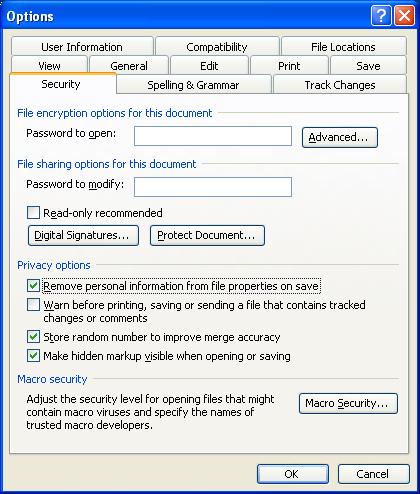
You’re at work and you and several reviewers have made changes to a document using track changes. However, you don’t want to send the client a document showing internal editing, but just a coherent single author track changes document.
Solution:
You remove the author information in the privacy settings and all track changes show as one author. In word 2003, it is under the menu Tools -> Options -> Security Tab -> “Remove personal information from file properties on save” checkbox.
DANGER:
Changes are still tracked. So it looks like the editor corrected him/herself. You will need to accept deleted insertions.
Hope that helps.
–Ben
Nevermind I found the same thing as 2010, I didn’t see before. Thank you! (or mod me out but thanks anyways)
Glad it worked. Sorry about the delay in responding. My blog software broke and needed me to go in and debug it.
How about on 2013/Office 365? Thanks, this is the the closest I have found so far!
many thanks for this quick and easy way to remove the information of several user edits.
Saves me time not having to edit the users documents for them, now they can do it themselves.
Is there any way to reverse this in MS Word 2010, so that the any new comments can come from a different author?
Any new comments will show as the author that types them. However, if you choose to anonymize again, then they will all show as one author.
Hope that helps!
–Ben
How do I do this (Fix – Make All Track Changes be One Reviewer) in MS Word 2010
File Tab -> Info Selector (on the left) -> Check for Issues Box -> Inspect Document Option -> Inspect Button (Bottom Right) -> Document Properties and Personal Information Line Item -> Remove All Button -> Close
After that, you will need to save the document for the settings to take effect. Remember that further editing the document will place edit marks on top of the anonymous “Author” edit marks.
Hope that helps.
–Ben
Fantastic! This is awesome help and information…thank you!