Totally Doodgical
A look at business, law and life from a technophile.

 PROBLEM: PCLaw crashes right after you type in your password to your books. In no way can you login. You get the error message that “Windows Accounting Software for Lawyers has stopped working.”
FIX: Uninstall Internet Explorer 9, which should roll you back to Internet Explorer 8. PCLaw cannot function with Internet Explorer 9 unless you have PCLaw v10 Service Pack 5 Hotfix 3. Here’s the steps:
Explanation: PCLaw most likely uses Internet Explorer for some things under the hood. Apparently IE 9 breaks compatibility with the functionality of older versions of IE. Luckily, it looks like those who run XP will not be hit by the problem, as IE 9 won’t run on XP.
Hope this helps,
–Ben
Sources: Lexis PCLaw, Affinity Consulting, Microsoft Windows Support, Computerworld

 I’m currently working with a company on the Utah Genius Website. I needed a layout quickly, as our invitations were about to be sent out. The company had used photoshop to do a proof of the layout, and we had settled on a good front page. They gave me the JPG to use as a placeholder while they created the HTML and CSS.
So I put up the image and dreaded making an image map for it. Luckily, I found a tool that would do HTML or HTML & CSS image mapping for me. Its called image-maps.com. It was quick, could work off of an online or uploaded image and gave me the code to modify at my whim.
They requested a donation, blog post, and link back. However, none were required. I decided to give the blog post (this post) and the link back, as its unobtrusive.
Thanks guys!
–Ben
Source: UtahGenius.com, Image-Maps.com
 PROBLEM:
If you’re like me, you discovered that the compatability pack for Office XP broke sometime earlier this year. You can’t open DOCX or XLSX files from outlook. You get a strange bunch of errors when opening DOCX and XLSX files and end up opening a file with a strange name in the temporary directory when it works.
FIX:
You have 3 choices:
I chose option 1, as it was was 160 bucks on newegg. Totally worth more than it would be to dig and fix. (it also requires a download of the install file, as there is no media)
As to option 2, rolling back the update can be difficult, because I couldn’t find the update. I didn’t dig, but it may be included in a service pack or corrected by another update.
As to option 3, I don’t recommend it because dll’s frequently have to be registered on the system. A find and replace could have very bad effects on your office – even breaking it.
WHY:
MS replaced mso.dll in the update. However, as far as I can tell, permissions in Vista are messed up. The program does not have the ability to fix bad registry settings and so ends up in a bad state. The workarounds that I’ve been reading about sound arduous and annoying, if they work. As Office XP is 8 years old, I’m guessing good old M$ doesn’t care if the old version is broken.
Hope that Helps.
–Ben
Sources: Allen Browne; The Daily Reviewer; Geekpedia

 Fix: Change the Offline Printer’s Port to an Online Similar Printer’s Port. As far I can tell, you can’t move the file / print job. You can just trick the spooler to use a different port which is connected to a different printer.
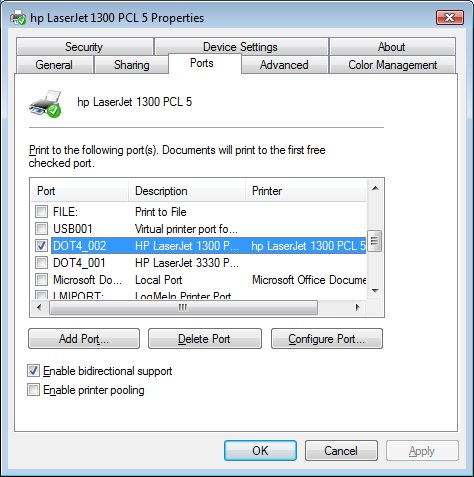
Problem: I had a friend who had printed a success page from a web page that he submitted very important documents. Unfortunately, he exited the browser before he made sure the printout came out. Worse yet, the print was assigned to an offline printer that no longer existed (we replaced that printer a while back). His print job was stuck in an offline printer spooler with no place to go. He wanted to move the print job from one printer to another printer.
Hope that helps.
–Ben
Source: Microsoft Answers
My parents had a program – Arts and Letters – that would not work on windows 7. Luckily, Windows 7 professional and ultimate (not home editions) come with a free windows xp virtual mode. It requires a download of three items. I’ll explain more later, but here’s the website:
Windows XP Mode and Virtual PC
PS – Your installed printers are available, you just have to select the “tsport” port for them to work. I had to do trial and error by printing a test page on each port until it came out.
PPS – You’ll need to click on the start menu option under Virtual PC for “Windows XP Mode” after installing the items from the previous link. Do not create your own virtual machine. The installation will be done for you by clicking “Windows XP Mode”
–Ben
Sources: Microsoft
 THE FIX:
Connect the drive to a friend’s laptop (or a sympathetic lab administrator) and ask them to access the files. The person must have Administrative Rights on the computer. Almost everyone’s personal laptop account has administrative rights.
Background:
My brother’s friend’s computer just up and died at Stanford. He had an article due and was sweating that he couldn’t get it back. He did everything right. He got an external hard drive enclosure and put the drive in the enclosure. He went to the library and hooked it up to a computer.
He tried to go into his “G:\Users\USERNAME\Documents” folder (in Vista and 7 – in XP its G:\Documents and Settings\USERNAME\My Documents”). However, he got the “Access Denied” error when he tried to go into “G:\Users\USERNAME”.
The Reason Why:
He was logged into a library computer as a “User” or a “Power User” without administrator permissions to files. The files on his hard drive belonged to “USERNAME” on his laptop and not to “SCHOOL USERNAME” on the school computer. Thus the library computer was respecting the file permissions.
So why doens’t this problem rear its ugly head with a jump drive? I think its because removable media is marked as for everyone. My guess is that User folders and system folders are the only ones protected.
Hope that helps.
–Ben
Sources: TechSpot, Microsoft.com
David Bradford just commented that every employee needs C.A.R.
C – A complex task – something they will wake up thinking about
A – Autonomy – trust – like Steven Covey’s speed of trust
R – Reward – a relevant reward – a plaque, stock options, something that motivates them
@UVEF – speech top 25 under 5
–Ben

 I requested to have FTPES (secure FTP) access on my godaddy account. Little did I know that they would have to transfer me servers. After the transition, my links broke from my subdomain that I used to host my pdf files. I got a
Forbidden - You don't have permission to access / on this server
when I tried to click on the links.
Here’s the problem: When Godaddy transferred my files to the new server, they did not update all the DNS entries and gave standard file permissions.
Fix:
Hope that helps.
–Ben
Sources: My Own Tinkering, Computerzz Helper
I came across this maddening error, when I had a website I needed to archive. I spidered the website, had a local copy that looked good, and uploaded the website. But, now the website had “an error occurred while processing this directive” right where some important content existed (the sidebar).
As it turns out, the error is from SSI – server side includes. I had
<!--#comment-->
sprinkled liberally throughout the code. And yes, it was a wordpress blog I intended to archive. The wordpress theme had rendered the code after the SSI, so it would work fine while in wordpress, but would not upload correctly.
Solution:
change
<!--#comment-->
to
<!-- comment-->
Totally easy fix, once you know.
Hope that helps,
–Ben
Sources: Bluehost Forum

I was updating a document at work and came across a strange occurance. My cursor would just go down off the page, but wouldn’t arrive at the next page. It turns out that the table had an incorrect setting. Here’s the fix:
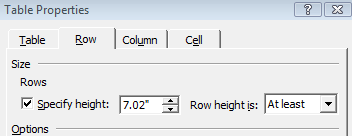
Hopefully that helps someone out there.
–Ben
Sources: Personal Frustration